This feature is only available to subscription administrators, using the Nialli Administration Portal.
Archiving a plan in Visual Planner allows subscription administrators to remove completed or inactive plans from active use while preserving their data for reference and reporting purposes. Archiving helps keep the subscription environment organized without permanently deleting information. It opens up a plan instance in the subscription so it can be used for a new plan.
Archived plans are no longer editable but remain available for viewing and reporting. If the plan data is required after the plan is archived, choose Export data in the reports area to create an Excel file of the plan data.
What happens when a plan Is archived?
When a plan is archived:
- The plan becomes read only
- Users can no longer make changes to assignments or data
- The plan no longer appears in active plan lists by default
- Historical data is retained for reporting and audit purposes
Warning: When a plan is archived, it cannot be reverted back to a working plan. Only archive a plan when your project is complete and/or you are certain you will not need to edit the content of your plan.
How to archive a plan
- Login to the Nialli Administration Portal on a web browser.
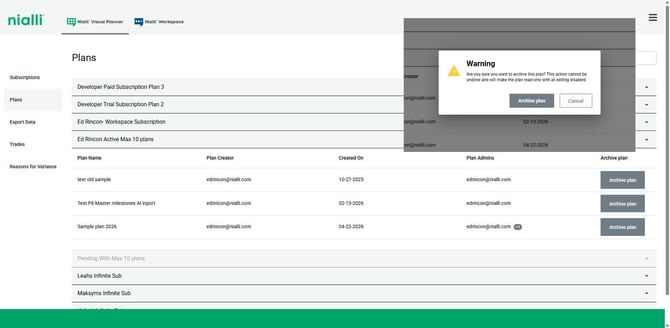
- Click on Plans tab, to list all available plans.
- Locate the plan you want to archive, and click Archive plan
- A warning message appears that the archiving is not reversible.
- Choose Archive plan to complete the process or Cancel to discontinue.
The plan is immediately moved to Archived status. When a plan is archived, it cannot be reverted back to a working plan.
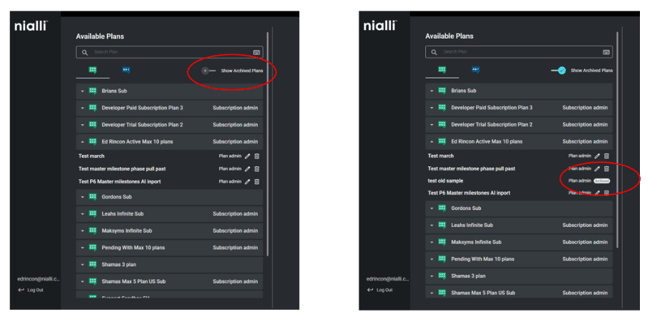
Archived Plan Visibility
Archived plans are hidden from the plan list by default to keep active plans easy to find. You can show or hide archived plans at any time using the toggle in the plan list.