
 Laura Avery
Data center project delivery: Overcoming construction challenges with collaborative planning
Surging AI demand has led to an increased volume in data center construction projects, presenting risks around long-lead MEP equipment sourcing,...
|
The Last Planner® System (LPS®) transforms construction scheduling by shifting from rigid, top-down master plans to collaborative, commitment-based workflows led by the trade leads and superintendents closest to the work. By structuring site coordination around five core conversations—Should, Can, Will, Did, and Learn —across eight interconnected phases, LPS replaces guesswork with reliable commitments, lookahead constraint management, and daily accountability. Implementing LPS consistently boosts Percent Plan Complete (PPC) from the industry baseline of ~54% to 80% or higher, drastically cutting downtime and rework. Moving from physical sticky notes to digital platforms like Nialli Visual Planner keeps multi-trade teams aligned in a single, real-time workspace with automated PPC tracking across every jobsite. |
You were given a specific start and end date, and then something caused a delay. You found out on-site, day-of, unable to move ahead. It was frustrating and inconvenient, and it created a snowball effect of issues between teams.
Lean construction fixes all that by treating the whole project as a single connected workflow rather than a string of separate handoffs.
The Last Planner® System (LPS®) is the vehicle that drives Lean construction by bringing the scheduling decisions directly to the trades leads and superintendents who are actually doing the work.
This guide covers what the LPS is, how it connects to Lean principles and how construction teams use digital tools like Nialli™ Visual Planner to keep the entire project on schedule.
So, what is the Last Planner System, exactly? Originally adapted from Toyota's manufacturing system in the 1990s by Glenn Ballard and Greg Howell, the LPS method has become one of the most common Lean construction techniques used on complex construction projects, including hospitals and industrial plants.
The Last Planner System is the framework on which Lean construction philosophy runs on a jobsite: a collaborative, commitment-based planning method that puts scheduling decisions in the hands of the Last Planners®, superintendents, forepersons and trade leads closest to the work.
Rather than handing crews a fixed schedule built weeks in advance, LPS asks the people doing the work what they should, can and will commit to, and then it tracks whether they did the tasks, so the team can learn from plan failures and improve the next phase. Unlike traditional master planning methods, which are locked in early and rarely revisited, LPS treats scheduling as an ongoing conversation that’s always evolving.
LPS requires construction teams to put Lean construction principles into practice, task by task, week by week, in a way that other Lean methodologies borrowed from manufacturing rarely manage: the variability of a real construction site is exactly what LPS principles are built to handle.

Six Lean principles sit underneath all of this:
Respect for people: Enabling the crews doing the work to help decide how and when the work gets done, rather than just being told a date.
Removal of waste: Cutting wasted time, motion and materials, not headcount.
Focus on process and flow: Keeping work moving steadily between trades instead of it stalling and then being rushed to catch up.
Generation of value: Measuring progress by what the owner actually receives, not just what got checked off a task list.
Continuous improvement: Reviewing what went wrong each week and fixing it the next week and on the next project.
Optimizing the whole: Making the call that helps the entire project finish on time, even when one trade could move faster by working around everyone else.
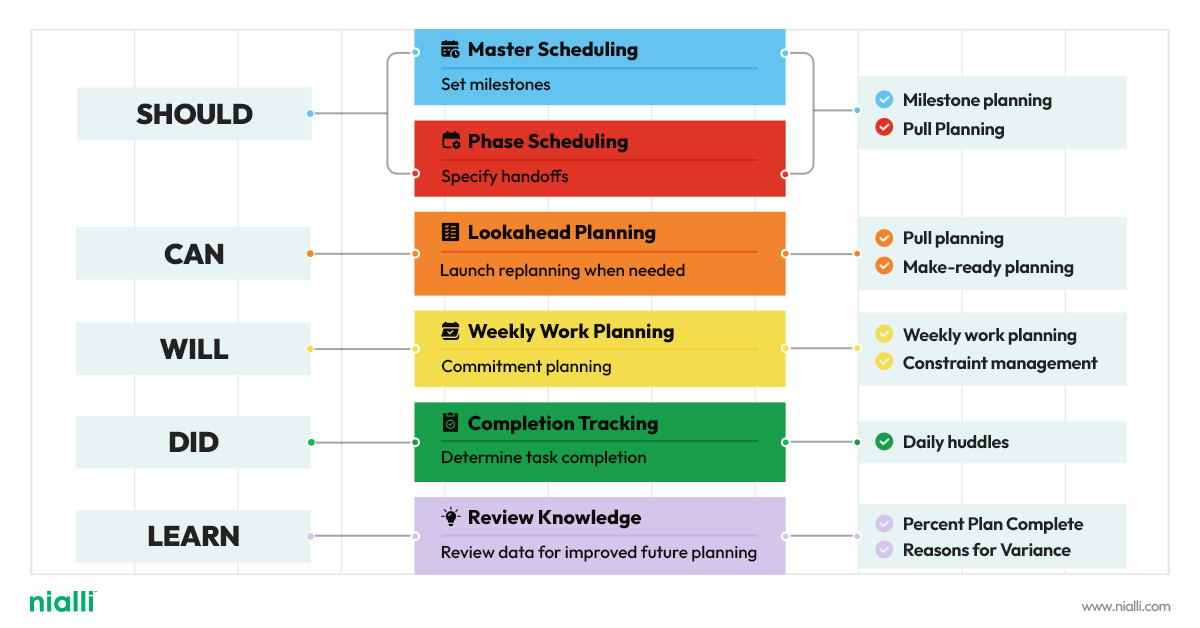
The LPS focuses on eight elements, structured around five conversations that carry a task from first idea to lessons learned:
What should be done?
What can be done?
What will be done?
What did we do?
What did we learn and how can we improve?
Each phase focuses on a different commitment — one conversation building on the last.
.jpg?width=940&height=790&name=Nialli-The%20Last%20Planner%20System-Infographic-V2%20(1).jpg)
Major project milestones anchor phase planning and phase scheduling, setting the fixed points from which the rest of the schedule works backward.
Trade crews and project teams work backward from major milestones, such as completion dates, mapping out what should happen and in what order across each project and construction phase, so crews complete tasks in the order the project requires.
Also called lookahead planning, this covers the weeks ahead and asks whether the upcoming tasks can realistically happen. Teams identify constraints, missing materials, permits, and unfinished prerequisite work and resolve them before a task reaches the weekly work plan, so upcoming work is ready to start on time or ahead of time.
Sometimes called commitment planning, this turns the master schedule into detailed plans and specific tasks for the upcoming week. Trades crews commit to what work they will complete for the week ahead, based on their intimate knowledge of their own crews and site conditions, not a schedule built without their input.
Beyond the weekly lookahead, teams keep identifying constraints on tasks anticipated to run into trouble and clear the path ahead of time, all week, not just during make-ready planning.
Short, standing check-ins track whether the promised tasks were completed, keeping project teams and all teams involved fully informed and catching slipping tasks days before they would surface in weekly meetings.
A running measure of plan reliability and one of the key metrics of a healthy LPS implementation. Percent Plan Complete (PPC) measures how many promised tasks were completed as planned. Teams that track PPC, and the reasons behind missed commitments, learn faster and carry that learning into the next project, the basis of continuous improvement in lean project delivery. This learning phase closes the loop back to pull planning on the next cycle.
When a task misses its date, teams log why, building a record that feeds continuous improvement on to the next project.
Together, these eight elements are the key components of a functioning Last Planner System. Construction teams that implement all eight tend to see more predictable project outcomes than teams that fail to go beyond pull planning.
Teams that adopt the Last Planner System know firsthand how effective this is. Case studies across LPS rollouts show Percent Plan Complete climbing from roughly 54% before implementation to 80% or higher once weekly work planning and constraint management are in place. That kind of jump in PPC tracks with fewer delays and less rework because the schedule reflects what trade crews can realistically deliver rather than what’s assumed on a spreadsheet.
The return shows up in three places:
Fewer missed milestones, because pull planning surfaces conflicts before they reach the construction site.
Less time lost to unplanned rework, because make-ready planning clears constraints ahead of the crew.
A shorter feedback loop, because reasons for variance get logged and fixed the same week instead of being buried in a postmortem.
For a general contractor running multiple trades on a tight schedule, that's the difference between hitting a completion date and explaining why it slipped.
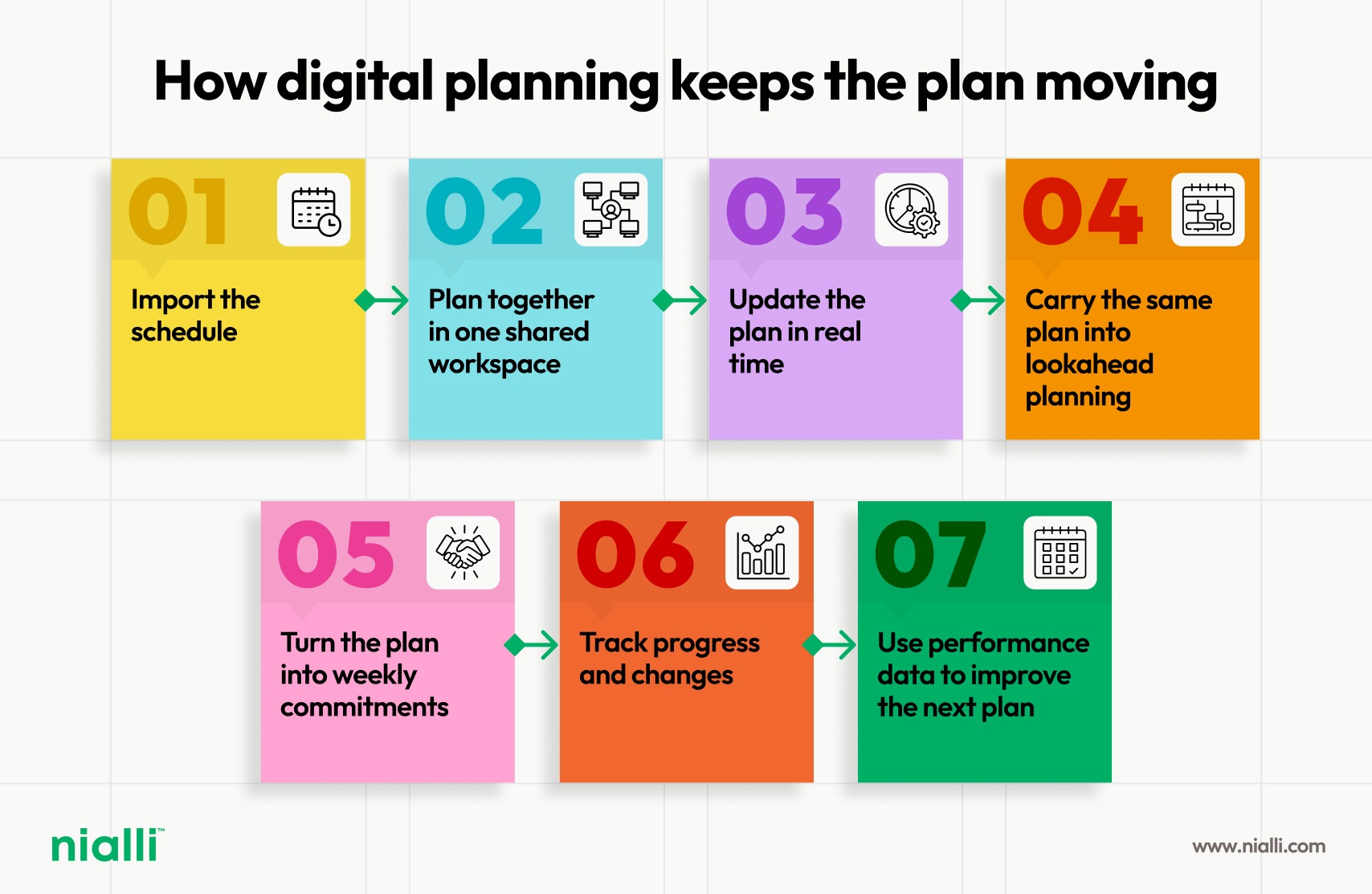
Sticky notes are excellent for facilitating conversation. They're much less effective at managing the thousands of decisions, dependencies and commitments that follow. As projects become larger and schedules change more frequently, maintaining alignment through whiteboards with paper sticky notes, spreadsheets and Gantt charts alone becomes nearly impossible.Digital pull planning software takes the collaborative process that makes pull planning successful and combines it with the visibility, accountability and persistence needed to manage modern construction projects. It enables data capture, resulting in robust reporting and analysis. Instead of recreating the plan after the session, teams continue working from the same shared environment, ensuring that everyone sees the latest information and understands how their work affects the activities that follow.
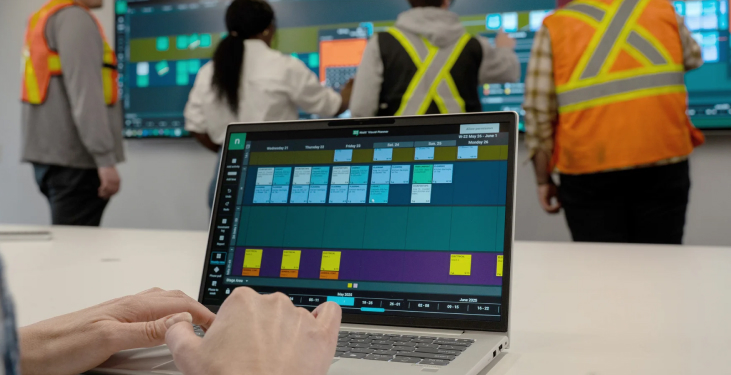
Nialli Visual Planner is built around the Last Planner System, so it supports the planning process construction teams already use: milestone planning, pull planning, make-ready planning, weekly work planning and Percent Plan Complete tracking — in one shared workspace. The result is a predictable workflow that trade crews can plan around and access from anywhere.
Digital pull planning boards that replace sticky notes without changing how trade crews already work
Lookahead planning views that flag constraints before they delay a task
Weekly work planning boards built for the project superintendent and trade leads
Built-in Percent Plan Complete (PPC) and reasons-for-variance tracking
Construction teams use Nialli Visual Planner on complex projects, from hospitals to data centers, industrial builds, and on jobs where project teams work across multiple construction sites and need one live schedule — not a photo of a whiteboard — to stay fully informed. It’s suited for a variety of teams, including general and specialty contractors, project owners and Lean specialists.
Adopting LPS doesn't require overhauling a project midstream. Most teams start with a single pull planning session for the next phase or major milestone, bringing trade leads into the room or onto the shared board to build the schedule together rather than having it sent to them.
The most common obstacle is buy-in. Trade crews who are used to being handed a schedule need to see that their input actually changes the plan, not just that they were invited to a meeting.
Running one make-ready planning cycle and one weekly work plan through to completion, including tracking PPC and logging reasons for variance, is usually enough to show the difference. From there, most teams expand the LPS phase by phase rather than rolling it out across the entire project at once.
A shared digital board removes a second common obstacle: keeping a paper or whiteboard schedule up to date across multiple trade crews and jobsites. That's where Nialli Visual Planner fits in.
Nialli Visual Planner is built specifically to run the Last Planner System — not a generic project management tool with LPS features as an afterthought.
It replaces sticky notes and whiteboards with digital pull planning boards that trade crews already know how to use. It tracks Percent Plan Complete and reasons for variance automatically, instead of on a spreadsheet after the fact. And it gives trade leads, project superintendents and project managers the same live schedule, whether they're on-site or checking in from another job.
For a general contractor running LPS across multiple construction sites, that means no more chasing down a photo of last week's board, because it’s at your fingertips.
Wherever a team is on its Lean journey, from a first pull planning session to a full LPS rollout, Nialli Visual Planner is the tool built to run it week to week.
Looking to implement the Last Planner System? Start a 30-day trial of Nialli Visual Planner — no credit card required.
LPS Lean construction shifts planning from a single scheduler working alone to trade crews planning together, working backward from milestones, clearing constraints before work starts and measuring Percent Plan Complete every week.
No. Some of its ideas, such as short planning cycles and tracking commitments rather than estimates, have been adopted outside construction, including by software development teams running agile sprints.
Percent Plan Complete is the number of promised tasks completed in a given week, divided by the total number of tasks promised, shown as a percentage. Tracking PPC over time shows whether planning is getting more reliable.
No. Nialli Visual Planner is fully web-based, so trade crews and project teams log in from any device at software.nialli.com. The Google Chrome™ browser is recommended.
.png)
Surging AI demand has led to an increased volume in data center construction projects, presenting risks around long-lead MEP equipment sourcing,...
Big Room planning brings multidisciplinary construction teams together to align schedules, identify constraints and map dependencies...

Large-scale data center projects demand careful coordination because of their schedule-sensitive nature. Yet, effective collaboration isn’t...
Going from analog to digital with Nialli™ Visual Planner has transformed construction planning for Mace, with enhanced precision and greater...
Build a collaborative planning culture for data center projects. Learn how Lean methods and expert coaching drive schedule certainty and project...
Extreme Concrete leaders describe Nialli Visual Planner's benefits, with better planning, less stress, improved communication and increased...